myCSG © |Area: SDTM| Concept: FT : Functional Tests | Lesson: L6MWT : SDTM FT dataset - 6MWT - Six Minute Walk Test |
Background |
|
What type of information is typically collected or presented? |
|
- Complete key programming for SDTM FT domain
- This lesson is about a functional test named Six Minute Walk Test
- This test examines the cumulative distance walked every minute walked up to 6 minutes
- Programming aspects include:
- Creation of rows for testcds from variables using arrays
- Derivation of --LOBXFL
- Creation of study day and other SDTM general variables
SMWT : Six Minute Walk Test
| Question | Response |
|---|---|
| Date Collected [FTDAT_RAW] |
|
| Assissted Device [SMWT_DEVICE] |
|
| Distance at 1 minute [SMWT_1] |
|
| Distance at 2 minutes [SMWT_2] |
|
| Distance at 3 minutes [SMWT_3] |
|
| Distance at 4 minutes [SMWT_4] |
|
| Distance at 5 minutes [SMWT_5] |
|
| Distance at 6 minutes [SMWT_6] |
|
| SUPP | VARIABLE_NAME | VARIABLE_LABEL | TYPE | GENERAL_COMMENT | FORM_SMWT |
|---|---|---|---|---|---|
| _ | STUDYID | Study Identifier | Char | Populate as 'statschoice' | |
| _ | DOMAIN | Domain Abbreviation | Char | Populate as 'FT' | |
| _ | USUBJID | Unique Subject Identifier | Char | Concatenate the value of STUDYID variable to SUBJECT variable with a hyphen in between. | |
| _ | FTSEQ | Sequence Number | Num | Sort the records by USUBJID, FTCAT, FTTESTCD, FTDTC and set to 1 on the first record for each subject, and increment by 1 for each subsequent record within the subject | 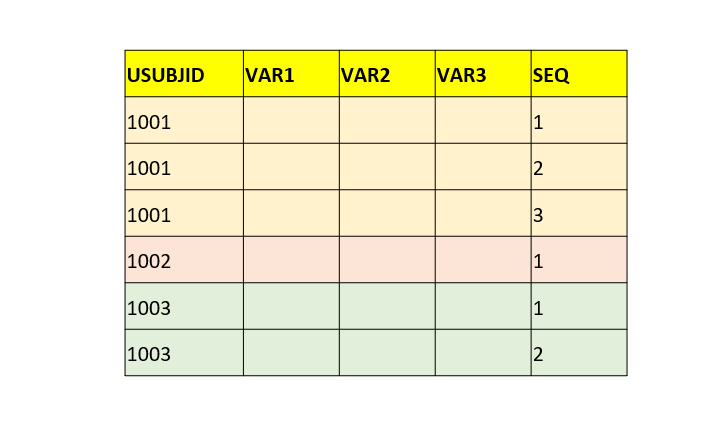 |
| _ | FTTESTCD | Short Name of Test | Char | 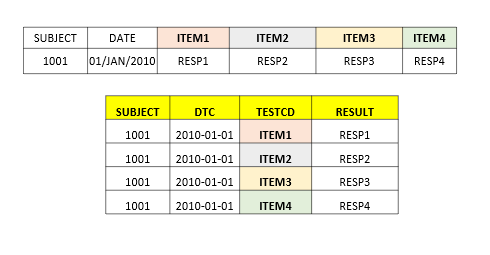 |
Create a record with FTTESTCD=SIXMW101 to store the result from SMWT_1. Create a record with FTTESTCD=SIXMW102 to store the result from SMWT_2. Create a record with FTTESTCD=SIXMW103 to store the result from SMWT_3. Create a record with FTTESTCD=SIXMW104 to store the result from SMWT_4. Create a record with FTTESTCD=SIXMW105 to store the result from SMWT_5. Create a record with FTTESTCD=SIXMW106 to store the result from SMWT_6. |
| _ | FTTEST | Name of Test | Char | Populate as 'SIXMW1-Distance at 1 Minute' when FTTESTCD=SIXMW101. Populate as 'SIXMW1-Distance at 2 Minutes' when FTTESTCD=SIXMW102. Populate as 'SIXMW1-Distance at 3 Minutes' when FTTESTCD=SIXMW103. Populate as 'SIXMW1-Distance at 4 Minutes' when FTTESTCD=SIXMW104. Populate as 'SIXMW1-Distance at 5 Minutes' when FTTESTCD=SIXMW105. Populate as 'SIXMW1-Distance at 6 Minutes' when FTTESTCD=SIXMW106. |
|
| _ | FTCAT | Category | Char | Populate as "SIX MINUTE WALK" | |
| _ | FTORRES | Result or Finding in Original Units | Char | Populate using SMWT_1 when creating row for FTTESTCD=SIXMW101. Populate using SMWT_2 when creating row for FTTESTCD=SIXMW102. Populate using SMWT_3 when creating row for FTTESTCD=SIXMW103. Populate using SMWT_4 when creating row for FTTESTCD=SIXMW104. Populate using SMWT_5 when creating row for FTTESTCD=SIXMW105. Populate using SMWT_6 when creating row for FTTESTCD=SIXMW106. |
|
| _ | FTORRESU | Original Units | Char | Populate as "m" | |
| _ | FTSTRESC | Result or Finding in Standard Format | Char | Populate with the values from FT.FTORRES | |
| _ | FTSTRESN | Numeric Result/Finding in Standard Units | Num | Popuate with the values from FT.FTSTRESC after converting to numeric format where applicable. | |
| _ | FTSTRESU | Standard Units | Char | Populate as "m" | |
| _ | FTLOBXFL | Last Observation Before Exposure Flag | Char | Populate as "Y" on the latest record with non-missing result on or prior to DM.RFXSTDTC for each subject and test. | |
| _ | FTEVAL | Evaluator | Char | Populate as "INVESTIGATOR" | |
| _ | VISITNUM | Visit Number | Num | Populate with the value from FOLDERSEQ | |
| _ | VISIT | Visit Name | Char | Populate with the value from FOLDERNAME | |
| _ | FTDTC | Date/Time of Test | Char | Populate using FTDAT_RAW after converting to ISO8601 format. | |
| _ | FTDY | Study Day of Test | Num | Populate using FT.FTDTC and DM.RFSTDTC. If FTDTC is on or after RFSTDTC then populate with the resulting value of FTDTC-RFSTDTC+1. Else if FTDTC is before RFSTDTC then populate with the resulting value of FTDTC-RFSTDTC. | |
| Y | FTASSTDV | Assisted Device | _isb | Populate with the value from SMWT_DEVICE |
Complete SAS code to generate the output is available for registered users!
Already registered! Login
Not registered, you can signup here! Signup
Dont want to register?
You can directly purchase this lesson (code+input data) here
Already registered! Login
Not registered, you can signup here! Signup
Dont want to register?
You can directly purchase this lesson (code+input data) here
You can purchase this lesson (code+input data) here
If you are looking to purchase subscription for full access to data and programs for all lessons (TASKS+SDTM+ADaM+TFLs), you can send us a message on +91-7330--77--66--49-- on Whatsapp.
R data is available only for R subscribers.
You can contact us on +91-7330--77--66---49 for purchasing subscription to R programs and data
You can contact us on +91-7330--77--66---49 for purchasing subscription to R programs and data
R codes are available only for R subscribers.
You can contact us on +91-7330--77--66---49 for purchasing subscription to R programs and data
You can contact us on +91-7330--77--66---49 for purchasing subscription to R programs and data