myCSG © |Area: SDTM| Concept: RELREC : Related Records | Lesson: L101 : SDTM RELREC dataset - Relationship creation using raw datasets |
Background |
|
What do we learn in this lesson? |
|
ADVERSE : Adverse Events
| Question | Response |
|---|---|
| Line number [aespid] |
|
| Adverse Event Term [aeterm] |
|
EOS : End of study
| Question | Response |
|---|---|
| Line number [dsspid] |
|
| Reason for end of study disposition [dsterm] |
|
| If reason is 'Adverse Event', then AE number [DSAENO] |
|
CONMEDS : Concomitant Medications
| Question | Response |
|---|---|
| Line number [cmspid] |
|
| Medication/Treatment [cmtrt] |
|
| If this medication is used for an 'Adverse Event', then AE numb [cmaeno] |
|
| SUPP | VARIABLE_NAME | VARIABLE_LABEL | TYPE | GENERAL_COMMENT | FORM_EOS | FORM_CONMEDS |
|---|---|---|---|---|---|---|
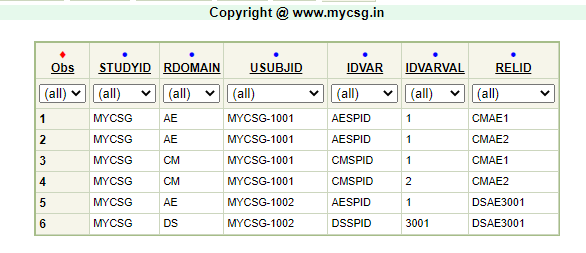
| _ | General | _isb | When the subject discontinued a study due to an adverse event, the event line number is captured on EOS form to indicate the relationship between the discontinuation and a specific adverse event. The line number of each adverse event in adverse event is mapped to SDTM variable AESPID. Each row on EOS form is uniquely identified within a subject using line number and it is mapped to SDTM variable DSSPID A link is established between DSSPID and AESPID using eos.dsaeno. |
When the subject took a medication for an adverse event, the event line number is captured on CONMEDS form to indicate the relationship between the treatment used and a specific adverse event. The line number of each adverse event in adverse event is mapped to SDTM variable AESPID. Each row on CONMEDS form is uniquely identified within a subject using line number and it is mapped to SDTM variable CMSPID A link is established between CMSPID and AESPID using conmeds.cmaeno. |
||
| _ | STUDYID | Study Identifier | Char | Populate as 'statschoice' | ||
| _ | RDOMAIN | Related Domain Abbreviation | Char | Create two records for each non-missing value of eos.dsaeno (where eos.SUBJECT = adverse.SUBJECT and eos.dsaeno = adverse.aespid ) and set to 'DS' and 'AE' | Create two records for each non-missing value of conmeds.cmaeno (where conmeds.SUBJECT = adverse.SUBJECT and conmeds.cmaeno = adverse.aespid ) and set to 'CM' and 'AE' | |
| _ | USUBJID | Unique Subject Identifier | Char | Concatenate sdtm.relrec.STUDYID to SUBJECT with a hyphen in between. | Concatenate sdtm.relrec.STUDYID to SUBJECT with a hyphen in between. | |
| _ | IDVAR | Identifying Variable | Char | Set to DSSPID when RDOMAIN = DS and 'AESPID' when RDOMAIN = AE | Set to CMSPID when RDOMAIN = CM and 'AESPID' when RDOMAIN = AE | |
| _ | IDVARVAL | Identifying Variable Value | Char | Set to eos.dsspid when RDOMAIN = DS and adverse.aespid when RDOMAIN = AE | Set to conmeds.cmspid when RDOMAIN = CM and adverse.aespid when RDOMAIN = AE | |
| _ | RELTYPE | Relationship Type | Char | Leave null | Leave null | |
| _ | RELID | Relationship Identifier | Char | Concatenate "DSAE" as a prefix to eos.dsspid. | Concatenate "CMAE" as a prefix to conmeds.cmspid. |
Complete SAS code to generate the output is available for registered users!
Already registered! Login
Not registered, you can signup here! Signup
Dont want to register?
You can directly purchase this lesson (code+input data) here
Already registered! Login
Not registered, you can signup here! Signup
Dont want to register?
You can directly purchase this lesson (code+input data) here
You can purchase this lesson (code+input data) here
If you are looking to purchase subscription for full access to data and programs for all lessons (TASKS+SDTM+ADaM+TFLs), you can send us a message on +91-7330--77--66--49-- on Whatsapp.
R data is available only for R subscribers.
You can contact us on +91-7330--77--66---49 for purchasing subscription to R programs and data
You can contact us on +91-7330--77--66---49 for purchasing subscription to R programs and data
R codes are available only for R subscribers.
You can contact us on +91-7330--77--66---49 for purchasing subscription to R programs and data
You can contact us on +91-7330--77--66---49 for purchasing subscription to R programs and data