myCSG © |Area: SDTM| Concept: CV : Cardiovascular System Findings | Lesson: L101 : Cardiovascular System Findings - Echocardiogram Results |
Background |
|
What type of information is typically collected or presented? |
|
_max_bytes(150000)_strip_icc()/GettyImages-97537745-59efa47d6f53ba0011c0070b.jpg)
Cardiovascular System Findings, Example showing one record where none of the tests are performed, EXample showing one record where only some of the tests were performed
Lesson description will be added soon
Lesson description will be added soon
ECHO : Echocardiogram
| Question | Response |
|---|---|
| Assessment Performed? [ECHO_YN] |
No Yes |
| If Yes, date performed [ECHODAT] |
|
| Left ventricular ejection fraction (LVEF) (%) [LVEF] |
|
| Estimated Right ventricular ejection fraction (RVEF) (%) [RVEF] |
|
| VARIABLE_NAME | VARIABLE_LABEL | TYPE | GENERAL_COMMENT | FORM_ECHO |
|---|---|---|---|---|
| STUDYID | Study Identifier | Char | Set to 'statschoice' | |
| DOMAIN | Domain Abbreviation | Char | Set to 'CV' | |
| USUBJID | Unique Subject Identifier | Char | Concatenate ECHO.PROJECT and ECHO.SUBJECT with a hyphen in between. | |
| CVSEQ | Sequence Number | Num | Sort the records by USUBJID, CVDTC, VISITNUM, VISIT, CVSPID and assign as 1 on the first record of each subject and increment by 1 for each subsequent record for that subject. | |
| CVSPID | Sponsor-Defined Identifier | Char | Populate using ECHO.RECORDPOSITION in three digit format padding with leading 0's where applicable. | |
| CVTESTCD | Short Name of Cardiovascular Test | Char | Create one record for each test collected. Populate as 'LVEF' when creating the record using 'LVEF'. Populate as 'RVEF_E' when creating the record using 'RVEF'. Populate as 'CVALL' when creating the record where ECHO.ECHO_YN='No'.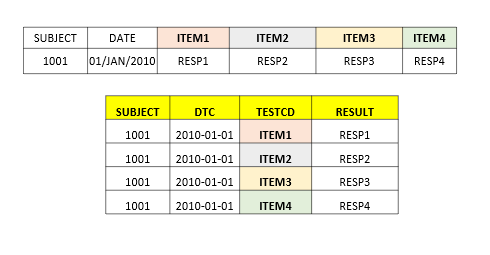 |
|
| CVTEST | Name of Cardiovascular Test | Char | Populate as 'Left Ventricular Ejection Fraction' when CVTESTCD='LVEF'. Populate as 'Right Ventricular Ejection Fraction, Est' when CVTESTCD='RVEF_E'. Populate as 'Cardiovascular Test Results' when CVTESTCD='CVALL'. | |
| CVCAT | Category for Cardiovascular Test | Char | Set to 'ECHOCARDIOGRAM' | |
| CVORRES | Result or Finding in Original Units | Char | Populate using ECHO.LVEF, ECHO.RVEF | |
| CVORRESU | Original Units | Char | Set to '%' when CVORRES is not null. | |
| CVSTRESC | Character Result/Finding in Std Format | Char | Populate using SDTM.CV.CVORRES | |
| CVSTRESN | Numeric Result/Finding in Standard Units | Num | Convert SDTM.CV.CVSTRESC to numeric value where applicable. | |
| CVSTRESU | Standard Units | Char | Populate using SDTM.CV.CVORRESU | |
| CVSTAT | Completion Status | Char | Set to 'NOT DONE' when ECHO.ECHO_YN='No'. Set to 'NOT DONE' when ECHO.LVEF is missing when creating LVEF test. Set to 'NOT DONE' when ECHO.RVEF is missing when creating RVEF_E test. | |
| CVREASND | Reason Not Done | Char | Set to 'Not Collected' when SDTM.CV.CVSTAT='NOT DONE' | |
| CVMETHOD | Method of Test or Examination | Char | Set to 'ECHOCARDIOGRAM' | |
| CVBLFL | Baseline Flag | Char | Set to "Y" on the latest record with non-missing result on or prior to SDTM.DM.RFSTDTC per each test. | |
| VISITNUM | Visit Number | Num | Populate using FOLDERSEQ for scheduled visits. For unscheduled visits, add.01 to the previous scheduled or unscheduled visit number and assign the value assign the value as 'x.xx' (for programming purposes, use SDTM.SV dataset to get the VISITNUM associated with the unscheduled visit date). | |
| VISIT | Visit Name | Char | Populate using FOLDERNAME after converting to upper case for scheduled visits. For unscheduled visits, add 1 to the previous scheduled or unscheduled visit number and assign the value as the prior scheduled visit name with ' - Unscheduled x' added where x reflects the unscheduled visit number (for programming purposes, use SDTM.SV dataset to get the VISIT associated with the unscheduled visit date). | |
| EPOCH | Epoch | Char | Populate using SDTM.SE.EPOCH by comparing CVDTC with SESTDTC and SEENDTC of each element of the subject. Populate as 'SCREENING' when the record falls on the boundary of SCREENING and TREATMENT elements. Populate as 'TREATMENT' when the record falls on the boundary of TREATMENT and FOLLOW-UP. 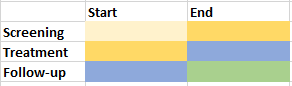 |
|
| CVDTC | Date/Time of Test | Char | Populate using ECHO.ECHODAT in ISO 8601 format. | |
| CVDY | Study Day of Visit/Collection/Exam | Num | If the SDTM.CV.CVDTC is on or after reference start date then SDTM.CVSTDTC-SDTM.DM.RFSTDTC +1. Else if date is before reference start date then assign as SDTM.CM.CVSTDTC-SDTM.DM.RFSTDTC. |
Complete SAS code to generate the output is available for registered users!
Already registered! Login
Not registered, you can signup here! Signup
Dont want to register?
You can directly purchase this lesson (code+input data) here
Already registered! Login
Not registered, you can signup here! Signup
Dont want to register?
You can directly purchase this lesson (code+input data) here
You can purchase this lesson (code+input data) here
If you are looking to purchase subscription for full access to data and programs for all lessons (TASKS+SDTM+ADaM+TFLs), you can send us a message on +91-7330--77--66--49-- on Whatsapp.
R data is available only for R subscribers.
You can contact us on +91-7330--77--66---49 for purchasing subscription to R programs and data
You can contact us on +91-7330--77--66---49 for purchasing subscription to R programs and data
R codes are available only for R subscribers.
You can contact us on +91-7330--77--66---49 for purchasing subscription to R programs and data
You can contact us on +91-7330--77--66---49 for purchasing subscription to R programs and data