myCSG © |Area: ADaM| Concept: C1006 : ADaM BDS - Baseline Concepts | Lesson: L101a : Creation of baseline flag, base, chg and pchg variables |
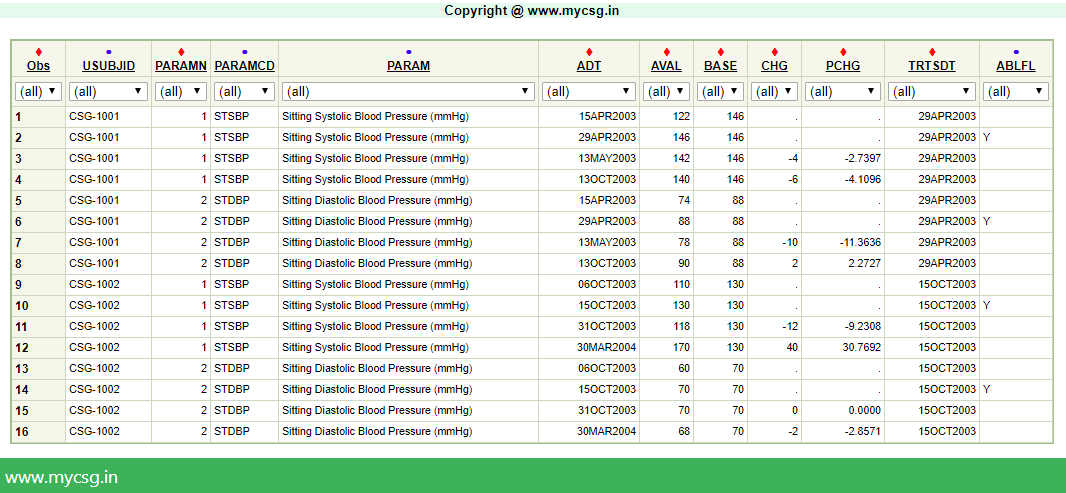
Baseline result
ADaM implementation
|
| VARIABLE_NAME | VARIABLE_LABEL | DERIVATION |
|---|---|---|
| ADT | Analysis Date | Extract the date portion from VSDTC and convert it to numeric value |
| PARAM | Parameter | Set to propcase(VSPOS)||VSTEST||" ("||VSSTRESU||") |
| PARAMCD | Parameter Code | If VSPOS="SITTING" and VSTESTCD="SYSBP" then set to "STSBP", Else if VSPOS="SITTING" and VSTESTCD="DIABP" then set to "STDBP" |
| PARAMN | Parameter (N) | If PARAMCD="STSBP" then set to 1, Else if PARAMCD="STDBP" then set to 2. |
| AVAL | Analysis Value | Set to VSSTRESN |
| AVISIT | Analysis Visit | A. For the souce records: If VS.VISIT="SCREEN 1" then set to "Screening 1", Else if VS.VISIT="SCREEN 2" then set to "Screening 2", Else set to propcase(VS.VISIT) B. For the record with ABLFL="Y" set to "Baseline" |
| AVISITN | Analysis Visit (N) | A. For the souce records: If VS.VISIT="SCREEN 1" then set to -2, Else If VS.VISIT="SCREEN 2" then set to -1, Else Set to VS.VISITNUM B. For the record with ABLFL="Y" set to 0 |
| ABLFL | Baseline Record Flag | Set to "Y" on the latest record with non-missing result on or before treatment start date for each parameter within a subject |
| BASE | Baseline Value | Populate the AVAL from the record where ABLFL="Y" across all records of parmeter within a subject |
| CHG | Change from Baseline | Set to AVAL-BASE on the records where ADT>TRTSDT>. |
| PCHG | Percent Change from Baseline | Set to CHG/BASE*100 on records where ADT>TRTSDT>. and BASE is not in (0,.) |
Complete SAS code to generate the output is available for registered users!
Already registered! Login
Not registered, you can signup here! Signup
Dont want to register?
You can directly purchase this lesson (code+input data) here
Already registered! Login
Not registered, you can signup here! Signup
Dont want to register?
You can directly purchase this lesson (code+input data) here
You can purchase this lesson (code+input data) here
If you are looking to purchase subscription for full access to data and programs for all lessons (TASKS+SDTM+ADaM+TFLs), you can send us a message on +91-7330--77--66--49-- on Whatsapp.
R data is available only for R subscribers.
You can contact us on +91-7330--77--66---49 for purchasing subscription to R programs and data
You can contact us on +91-7330--77--66---49 for purchasing subscription to R programs and data
R codes are available only for R subscribers.
You can contact us on +91-7330--77--66---49 for purchasing subscription to R programs and data
You can contact us on +91-7330--77--66---49 for purchasing subscription to R programs and data