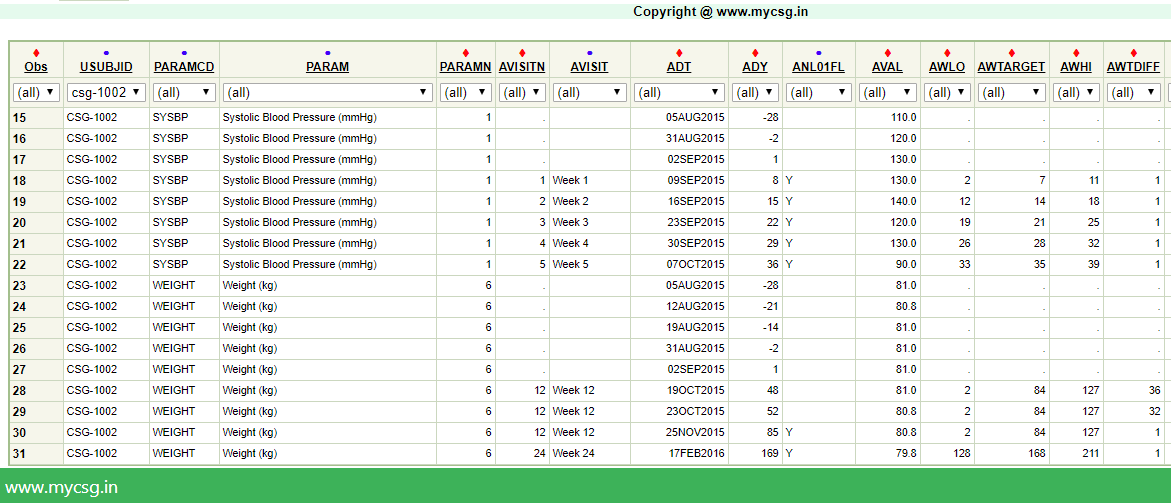
myCSG © |Area: ADaM| Concept: C1009 : ADaM BDS - Analysis Flags | Lesson: L102 : Creation of ANL01FL, multiple record within an analysis visit. Closest and latest record will be chosen |
Some examples of record selection algorithms:
- Select the earliest record within an analysis visit
- Select the latest record within an analysis visit
- Select the record that is closest to the target day within an analysis visit
- Select the record with lowest/highest/worst result across postbaseline records
- Select the records of the subject's who has experienced at least one 'Grade 4' lab toxicity
Background for an example analysis flag |
|
ADaM implementation |
|

| VARIABLE_NAME | VARIABLE_LABEL | DERIVATION |
|---|---|---|
| AWTDIFF | Analysis Window Diff From Target | Set to the absolute difference between ADY and AWTARGET (that is, ABS(ADY-AWTARGET)) |
| ANL01FL | Analysis Flag 01 | Set to "Y" on the record which is closest to target day with in an analysis visit. If there exists multiple records which are closest, pick the latest record. |
Complete SAS code to generate the output is available for registered users!
Already registered! Login
Not registered, you can signup here! Signup
Dont want to register?
You can directly purchase this lesson (code+input data) here
Already registered! Login
Not registered, you can signup here! Signup
Dont want to register?
You can directly purchase this lesson (code+input data) here
You can purchase this lesson (code+input data) here
If you are looking to purchase subscription for full access to data and programs for all lessons (TASKS+SDTM+ADaM+TFLs), you can send us a message on +91-7330--77--66--49-- on Whatsapp.
R data is available only for R subscribers.
You can contact us on +91-7330--77--66---49 for purchasing subscription to R programs and data
You can contact us on +91-7330--77--66---49 for purchasing subscription to R programs and data
R codes are available only for R subscribers.
You can contact us on +91-7330--77--66---49 for purchasing subscription to R programs and data
You can contact us on +91-7330--77--66---49 for purchasing subscription to R programs and data