myCSG © |Area: ADaM| Concept: C1007 : ADaM BDS - Visit Windowing | Lesson: L101 : Creation of visit windowing based on ADY and prespecified intervals - parameter invariant |
Background for visit windowing |
|
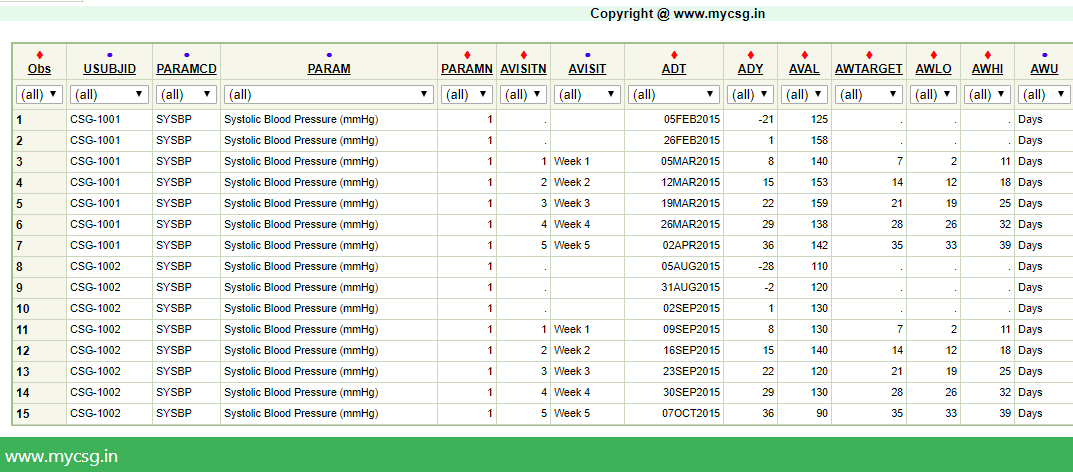
ADaM implementation |
|
| VARIABLE_NAME | VARIABLE_LABEL | DERIVATION |
|---|---|---|
| AVISIT | Analysis Visit | Populate as 'Week 1' if 2<=ADY<=11 Populate as 'Week 2' if 12<=ADY<=18 Populate as 'Week 3' if 19<=ADY<=25 Populate as 'Week 4' if 26<=ADY<=32 Populate as 'Week 5' if 33<=ADY<=39 |
| AVISITN | Analysis Visit (N) | Populate as 1 when AVISIT='Week 1' Populate as 2 when AVISIT='Week 2' Populate as 3 when AVISIT='Week 3' Populate as 4 when AVISIT='Week 4' Populate as 5 when AVISIT='Week 5' |
| AWTARGET | Analysis Window Target | Populate as 7 when AVISIT='Week 1' Populate as 14 when AVISIT='Week 2' Populate as 21 when AVISIT='Week 3' Populate as 28 when AVISIT='Week 4' Populate as 35 when AVISIT='Week 5' |
| AWLO | Analysis Window Beginning Timepoint | Populate as 2 when AVISIT='Week 1' Populate as 12 when AVISIT='Week 2' Populate as 19 when AVISIT='Week 3' Populate as 26 when AVISIT='Week 4' Populate as 33 when AVISIT='Week 5' |
| AWHI | Analysis Window Ending Timepoint | Populate as 11 when AVISIT='Week 1' Populate as 18 when AVISIT='Week 2' Populate as 25 when AVISIT='Week 3' Populate as 32 when AVISIT='Week 4' Populate as 39 when AVISIT='Week 5' |
| AWU | Analysis Window Unit | Set to 'Days' |
Complete SAS code to generate the output is available for registered users!
Already registered! Login
Not registered, you can signup here! Signup
Dont want to register?
You can directly purchase this lesson (code+input data) here
Already registered! Login
Not registered, you can signup here! Signup
Dont want to register?
You can directly purchase this lesson (code+input data) here
You can purchase this lesson (code+input data) here
If you are looking to purchase subscription for full access to data and programs for all lessons (TASKS+SDTM+ADaM+TFLs), you can send us a message on +91-7330--77--66--49-- on Whatsapp.
R data is available only for R subscribers.
You can contact us on +91-7330--77--66---49 for purchasing subscription to R programs and data
You can contact us on +91-7330--77--66---49 for purchasing subscription to R programs and data
R codes are available only for R subscribers.
You can contact us on +91-7330--77--66---49 for purchasing subscription to R programs and data
You can contact us on +91-7330--77--66---49 for purchasing subscription to R programs and data