myCSG © |Area: ADaM| Concept: C1001 : Subject Level Analysis Data | Lesson: L102 : Derivation of subject level population flags which are commonly used in ADSL |
|
|
|
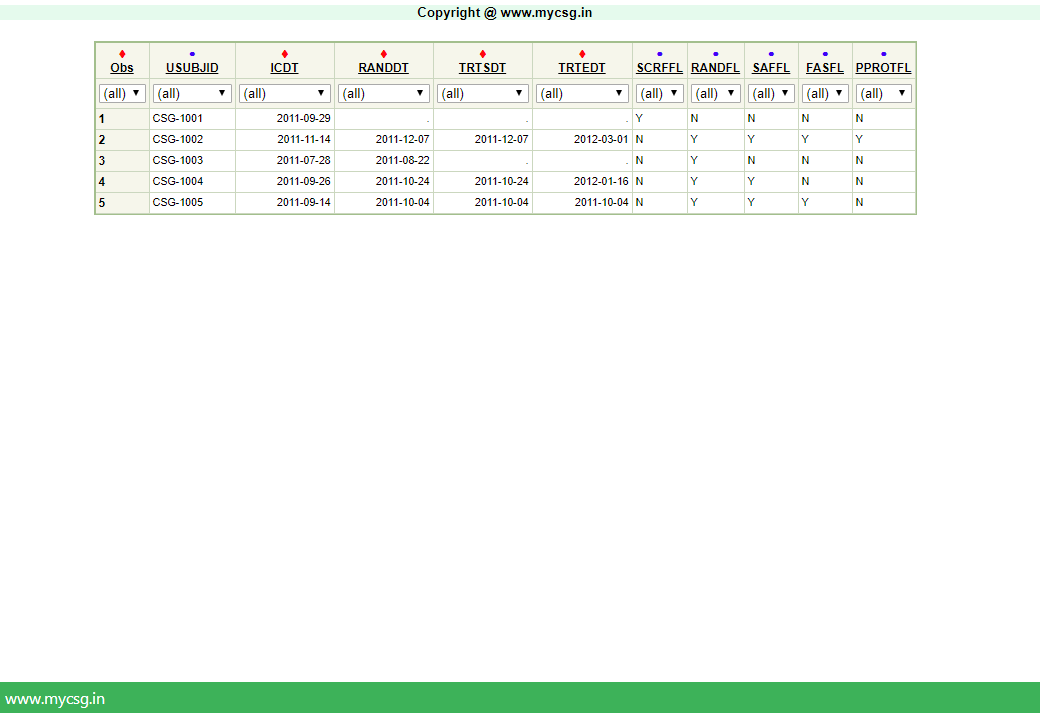
| In this lesson, we will see how to derive some of the population flags |
| VARIABLE_NAME | VARIABLE_LABEL | DERIVATION |
|---|---|---|
| RFICDT | Date of Informed Consent | Using DS dataset - get RFICDT as the numeric(datepart(DSSTDTC)) on the record where DSCAT="PROTOCOL MILESTONE" and DSSCAT="INFORMED CONSENT OBTAINED" and DSDECOD="SUBJECT INFORMED CONSENT". Note that this date will be missing if the subject has not signed the informed consent (or in case the team fails to capture the data in the DS dataset) |
| RANDDT | Date of Randomization | Using DS dataset - get RANDDT as the numeric(datepart(DSSTDTC)) on the record where DSCAT="PROTOCOL MILESTONE" and DSDECOD="RANDOMIZED". Note that this date will be missing if the subject has not been randomized for any reason (or in case the team fails to capture the data in the DS dataset) |
| TRTSDT | Date of First Exposure to Treatment | Using EX dataset - get TRTSDT as the numeric(datepart(EXSTDTC)) of the earliest record of a subject where EXCAT="TREATMENT PERIOD". Note that this date will be missing the subject has not been exposed to study treatment for any reason (or in case the team fails to capture the data in the EX dataset). Details: Subset the records from EX with the above given condition and sort by USUBJID and EXSTDTC and pick the earliest non-missing date. |
| TRTEDT | Date of Last Exposure to Treatment | Using EX dataset - get TRTEDT as the numeric(datepart(EXENDTC)) of the latest record of a subject where EXCAT="TREATMENT PERIOD". Note that this date will be missing the subject has not been exposed to study treatment for any reason (or in case the team fails to capture the data in the EX dataset). Details: Subset the records from EX with the above given condition and sort by USUBJID and EXENDTC and pick the latest non-missing date. Also note that this is the simplest case of derivation of TRTEDT - there can be multiple conditions to check for depending on how to handle ongoing subjects - which will be protocol specific |
| SCRFFL | Screen failure Population Flag | Create this flag using the data collected in DS dataset. If a subject has a record in DS dataset with the condition DSDECOD="DID NOT MEET ENTRANCE CRITERIA" then the subject would be called a screen failure. Populate this flag as ?Y? for all the screen failure subjects. For the rest of the subjects the flag will be populated as ?N?. |
| RANDFL | Randomized Population Flag | Create this flag using the data collected in DS dataset. If a subject has a record in DS dataset with the condition DSCAT="PROTOCOL MILESTONE" and DSDECOD="RANDOMIZED" then subject would be called as randomized, else the subject would be called non-randomized. Populate this flag as ?Y? for randomized subjects. For the non-randomized subjects the flag will be populated as ?N?. |
| SAFFL | Safety Population Flag | Create this flag using the data collected in EX dataset. A subject would be called a safety subject if he is randomized and has taken atleast one dose of study medication. In this example, populate SAFFL as ?Y? for those subjects who are randomized (RANDFL=?Y?) and have taken atleast one dose of study medication (TRTSDT NE .). For the non-safety subjects this flag will be populated as ?N?. |
| FASFL | Full Analysis Set Population Flag | Create this flag using the data collected in EX and LB dataset. A subject would be considered under full analysis set only if he is a safety subject with atleast one postbaseline efficacy measurement. For this example, HBA1C parameter value collected in LB dataset is considered as the key efficacy parameter. Populate FASFL as ?Y? for those safety subjects who have atleast one postbaseline HBA1C measurement in LB dataset (that is, subject should have a measurement in LB dataset with LBDTC > Treatment start date). FASFL will be populated as ?N? for the subjects who do not meet the above criteria. |
| PPROTFL | Per-Protocol Population Flag | Create this flag using the data collected in EX, LB and DV dataset. A subject would be considered under per protocol analysis set only if the subject meets all the criteria of full analysis set and meets none of the protocol specified deviations. A subjects? protocol deviations are collected in DV dataset. So, to consider under per protocol set, the subject should not have a record in DV dataset and satisfy all the conditions for FASFL ? populate PPROTFL as ?Y? for such subjects. PPROTFL will be ?N? for the rest of the subjects. |
Complete SAS code to generate the output is available for registered users!
Already registered! Login
Not registered, you can signup here! Signup
Dont want to register?
You can directly purchase this lesson (code+input data) here
Already registered! Login
Not registered, you can signup here! Signup
Dont want to register?
You can directly purchase this lesson (code+input data) here
You can purchase this lesson (code+input data) here
If you are looking to purchase subscription for full access to data and programs for all lessons (TASKS+SDTM+ADaM+TFLs), you can send us a message on +91-7330--77--66--49-- on Whatsapp.
R data is available only for R subscribers.
You can contact us on +91-7330--77--66---49 for purchasing subscription to R programs and data
You can contact us on +91-7330--77--66---49 for purchasing subscription to R programs and data
R codes are available only for R subscribers.
You can contact us on +91-7330--77--66---49 for purchasing subscription to R programs and data
You can contact us on +91-7330--77--66---49 for purchasing subscription to R programs and data