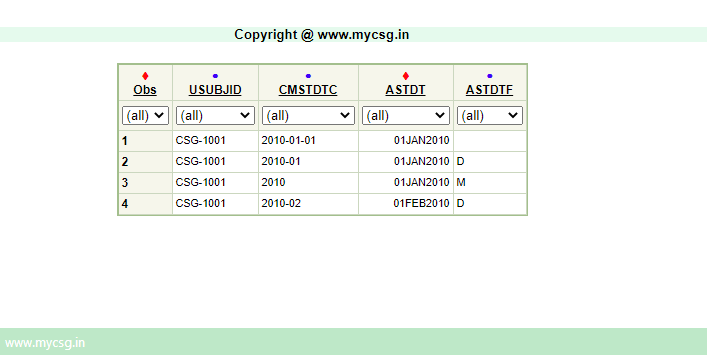
the date and time values are stored in character variables
dates usually correspond to a collection or observation date, start date and end date of an event or an intervention etc
Start dates have a prefix of ST, and end dates have a prefix of EN (eg: aeSTdtc, aeENdtc, exSTdtc, exENdtc etc)
Collection or observation dates do not have a specific prefix other than the domain name (eg: dmDTC, vsDTC, lbDTC etc)
For analysis purposes, we may want to separate the date and time components and create numeric versions of them
ADaM standard allows us to create numeric versions of the date and time values
Similar to other analysis variables, these numeric date/time/datetime variables will have a prefix of 'A' (begin with 'A') - 'A' stands for 'Analysis'.
Similar to SDTM, start is abbreviated as 'ST', end is abbreviated as 'EN'
Date variables have a suffix of 'DT', time variables have a suffix of 'TM' and datetime variables have a suffix of 'DTM'.
For any SDTM date variable, 3 numeric counterparts can be created in ADaM based on the precision of information collected. Below is an example using AESTDTC.
ASTDT - to represent date component of AESTDTC in numeric format
ASTTM - to represent time component of AESTDTC in numeric format
ASTDTM - to represent the datetime value of AESTDTC in numeric format
Similary, AENDT, AENTM, AENDTM are used to store the end date information
For collection or observation dates like VSDTC, LBDTC we can use
ADT for date component
ATM for time component
ADTM for datetime value
Imputations
In SDTM datasets, we just orgainze the collected date time values in ISO 8601 format but do not change them
This means, if a subject could recollect only the year and month of an adverse event date, we just report the year and month in AESTDTC in AE domain
For analysis purposes, we may want to 'assume' a value for the missing date or time components and use that value when creating analysis version date, time or datetime variables
These imputation rules must be/generally pre-specified in the protocol or statistical analysis plan of the study
ADaM standard allows for these imputations
When the date, time or datetime value on a particular record is imputed, we want to clearly communicate that imputation is performed
-DTF, -TMF, -DTMF varibales are used to communicate the level of imputatoin performed on a particular variable of a record
The allowed values in -DTF variable are
Y - to indicate that year is imputed
M - to indicate that month is imputed
D - to indicate that day is imputed
note, when we impute multiple components we use the letter corresponding to highest level of imputation. For example, when month and day are imputed on a record, we populate the variable with 'M' as the highest level of imputation is at month. Similarly, when year and day are imputed, we populate it 'Y' as the highest level of imputation is year here.
The allowed values in -TMF variable are
H- to indicate that hour is imputed
M - to indicate that minute is imputed
S - to indicate that second is imputed
The allowed values in -DTMF are a combination of allowed values in -DTF and -TMF variables. That is, Y, M, D, H, M, S.
In this lesson, we will a basic example of date imputation and it's programming implementation
VARIABLE_NAME
VARIABLE_LABEL
DERIVATION
ASTDT
Analysis Start Date
A. When Date collected is full: Convert to numeric format B. When the day component is missing Use '01' for day component and convert to numeric format C. When the month and day component are missing Use '01' for day component and '01' for month and convert to numeric format
ASTDTF
Analysis Start Date Imputation Flag
Set to 'M' when month and day components are imputed. Set to 'D' when day component is imputed.
Complete SAS code to generate the output is available for registered users!
Already registered! Login Not registered, you can signup here! Signup
Dont want to register?
You can directly purchase this lesson (code+input data) here
You can purchase this lesson (code+input data) here
If you are looking to purchase subscription for full access to data and programs for all lessons (TASKS+SDTM+ADaM+TFLs), you can send us a message on +91-7330--77--66--49-- on Whatsapp.
R data is available only for R subscribers.
You can contact us on +91-7330--77--66---49 for purchasing subscription to R programs and data
R codes are available only for R subscribers.
You can contact us on +91-7330--77--66---49 for purchasing subscription to R programs and data